Small Business Management Spreadsheet: CRM, Invoices, Projects, Expenses and KPI Dashboard
Run a small service business from one Excel or Google Sheets workbook: lead pipeline, customers, projects, invoices with overdue tracking, expenses, vendors, tasks, KPIs and a monthly review.
Secure checkout. You get the download right after purchase.
Requirements
- Microsoft Excel 2019 or later / Microsoft 365, or a free Google account for Google Sheets
Small Business OS is the back office for a one- to ten-person service business: designers, consultants, contractors, agencies, studios. It answers the questions that matter on a Monday morning: who owes you money and how late is it, what's in the pipeline, which projects are behind, what renews this month, and how this month compares with your target.
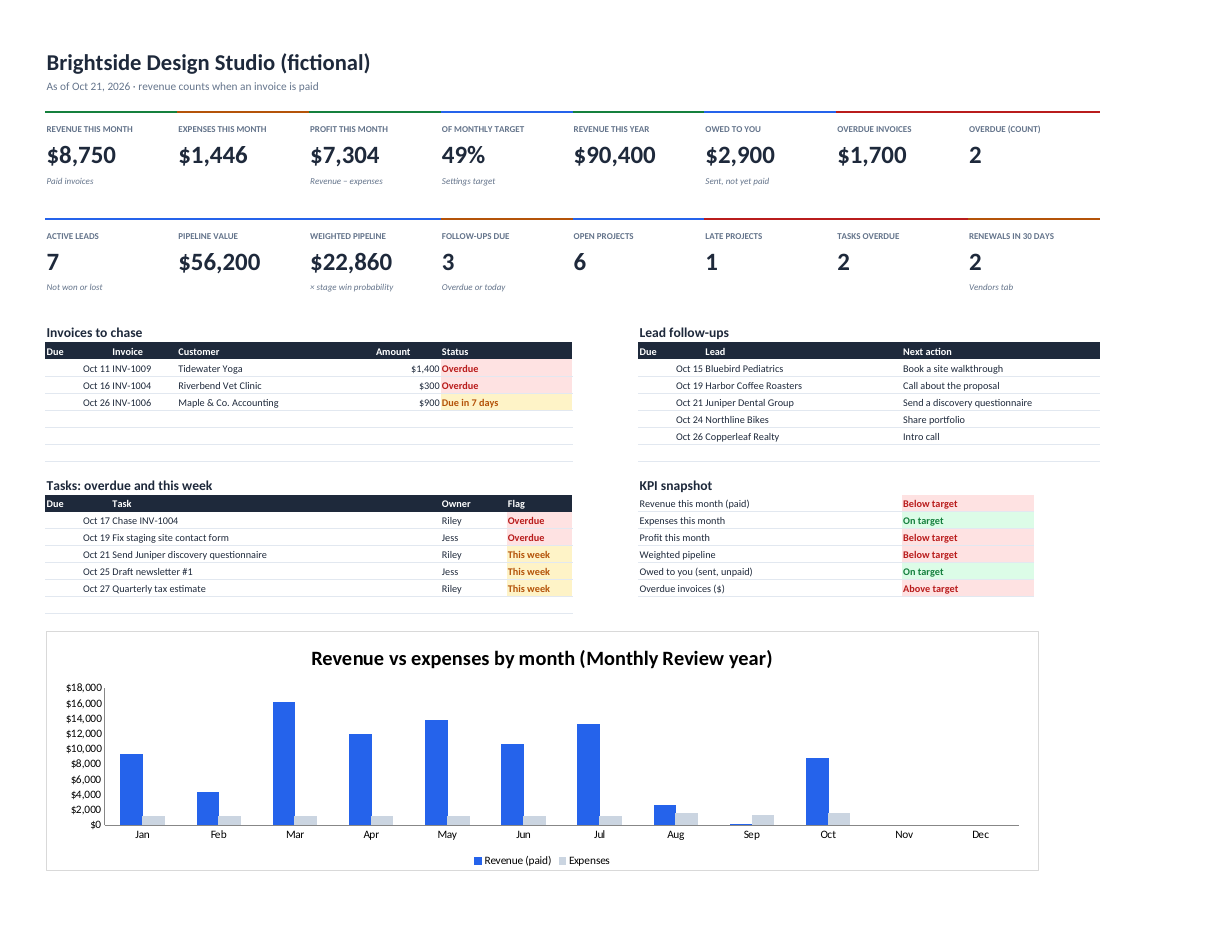
Revenue is counted when an invoice is paid, not when it's drafted or sent, so the dashboard never flatters you. Drafts never count as owed. Each invoice gets a due date from its own terms or your default, and moves from Open to Due in 7 days to Overdue on its own.
Customers, projects and invoices are linked by name: each customer shows lifetime revenue, what they owe now and their open projects. A Monthly Review tab fills revenue, expenses, profit, margin, new leads and invoices per month, with space for wins, issues and next month's priorities.
Features
Dashboard
Revenue, expenses and profit this month, revenue this year, owed to you, overdue invoices, pipeline and weighted pipeline, open and late projects, overdue tasks and upcoming renewals, plus invoices to chase, lead follow-ups and this week's tasks.
Invoices that track themselves
Draft, Open, Due in 7 days, Overdue, Paid, with days overdue. Per-invoice payment terms or your default.
Lead pipeline
Stages from New to Won or Lost, opportunity value, win probability per stage, weighted pipeline, follow-up dates and flags.
Customers and projects
Lifetime revenue and money owed per customer; project deadlines, budgets vs actual cost, late and over-budget flags.
Expenses and vendors
Expense log by category; each vendor's last-12-months spend, annual cost and renewal warnings.
KPIs and monthly review
Automatic KPIs with targets, trend and status, room for your own, and a month-by-month review of the year.
What's included
small-business-os.xlsx (blank: 500 leads, 300 customers, 200 projects, 1,000 invoices, 2,000 expenses)small-business-os-example.xlsx (a fictional design studio with a year of history)small-business-os-quick-start.pdf (setup, a 15-minute Monday routine, every number explained)README.txt and LICENSE.txt (one business per licence)
Verify your download: small-business-os-v1.0.0.zip SHA-256 f1dcaeba966d532f7cdc4701fa9dc21971b8e29eec9bc0681ad66332e135f360
Tested, and known limits
- Every dashboard number, each Monthly Review month, customer totals, vendor spend and the automatic KPIs are checked against an independent calculation on the example business
- Five deliberately broken rules (drafts counted as owed, revenue counted when invoiced, lost leads left in the pipeline, finished projects flagged late, invoice terms ignored) were each caught
- Blank workbook opens with no errors and no made-up numbers
- Recalculated in LibreOffice; only functions supported by Excel 2019+ and Google Sheets are used
Limits
- A management tool, not accounting software: no double-entry bookkeeping, tax returns or payroll
- One currency per file
- Apple Numbers may not calculate every formula
Licence, updates and support
Licence
Personal licence: use it for yourself or your own business's internal work. No resale or sharing of the files. Using it with clients, or redistributing it, needs a commercial licence. Ask. Full terms.
Updates
Includes bug-fix updates to this version (1.x). Current version: 1.0.0. Changelog.
Support
Documentation included. Bug reports answered by email within 2 business days. One-to-one setup help isn't included. Report a problem.
Questions
Is this accounting software?
No. It's a management dashboard for running the business day to day. Keep your bookkeeping and taxes in your accounting tool or with your accountant.
Does it work in Google Sheets?
It's built to: it only uses functions both apps support. (Tested in Excel-compatible LibreOffice; a full Google Sheets check is in progress.)
Can my team use it?
Yes. Put it in Google Sheets or a shared OneDrive folder. One licence covers one business.
Is my data private?
Yes. It's a file you keep. Nothing is sent anywhere.